Technology

Beta for the Beta

I got a copy of the Windows 7 Beta copy from my colleague and installed it on my Lenovo X61 tablet. The install went through pretty smoothly and . upon booting up the computer, me and my colleague had the following conversation..

Colleague : Thats a Beta!!

Me : Yes.. it is Beta..

Colleague : No.. No.. that”s a beta!!

Me : Dude.. seriously.. it is Beta.. I know it..

Colleague : (almost smacking me on my head) No..that is a Beta Fish!!

Looks like a smart programmer (or marketing person) put the picture of a Beta fish as the default background for Windows 7 Beta :-).. Here’s a screenshot.

Hopefully, Windows 7 will finally convince us XP lovers to upgrade. Vista is a failed operating system as far as I am concerned. Not in the league of “Windows Millenium“, but it is going to be shoved away into the annals of history soon if Windows 7 delivers as promised.

Tools of the trade : Postfix Configuration

Good link with information on configuring a custom transport link in Postfix. A transport link in a SMTP server is a way to define a communiction/delivery channel with particular settings. Example, you want all e-mails for a particular domain to be sent to a particular server at a particular time.

http://linuxnet.ca/postfix/dedicated_transport.html

In this particular link, the author shows the steps to configure a transport link for sending e-mails to servers/domains with high latency.

Visual outlook of Kudithipudi.org

I ran across an interesting app called Wordle, that the BBC news service, used to show a visual representation of all the words president Bush used in his state of Union speeches (http://news.bbc.co.uk/2/hi/americas/7813432.stm).

Wordle (http://www.wordle.net/) take text or a URL as input and automatically generates a visual representation of the text based on the number of times a term appears. Very cool application of Web 2.0  technology.

Here’s how this website looks after wordle analyzed it.

Wordle is a “toy” created by Jonathan Feinberg. Here is a good interview with him regdarding Wordle and how he created it (http://domino.research.ibm.com/comm/research.nsf/pages/d.compsci.can_i_have_a_wordle_with_you.html).

Support WikiPedia

It is the season of giving.. And who else can be more eligible than the WikiPedia Foundation. For those that use the Internet regularly, you know that WikiPedia has become an indispensable resource. This is collaboration and sharing in it’s purest sense. How many of your arguments end now with.. “I checked WikiPedia and I am correct” :).

I know that times are tough for many people, but if you do have the opportunity..take a minute to donate to the WikiPedia foundation. Click on the this link to go to the donation page .. http://wikimediafoundation.org/wiki/Donate/Now/en

They are aiming to raise $6MM and are up to $3.8MM now.

Loose the shackles..

If you need to edit documents, create spreadsheets and presentations… and don’t want to spend $$$ for Microsoft Office, download the latest version of OpenOffice for free and give it a try. You might be pleasantly surprised.

I wrote a post earlier about using OpenOffice as a free PDF Editor.. And that is just the tip of the iceberg of what you can do with OpenOffice.

Most of the people that use Microsoft Office, only use the basic functionality. As my old boss used to say, “95% of the people use 5% of the functionality in Office”. And switching to OpenOffice would be a breeze for then. OpenOffice is available for Microsoft Windows, Linux and Apple Mac OS X.

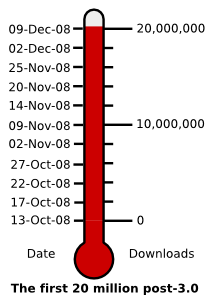
Since OpenOffice 3.0 was released back in October, the software has been downloaded more than 10 million times. And we are close to hitting 20 million downloads..Here’s a live counter from the OpenOffice website

How does the iPod touch detect your location?

If you are the proud owner of an iPod touch, you would have noticed that the Google maps application on it identifies your current location with scary preciseness. Every wonder, how the touch manages to do that without a GPS or cellular receiver? Apparently, Apple uses a service from a company called Skyhook Wireless to do this. And how does Skyhook achieve this? They drive around in vehicles scanning for wi-fi signals and create a database that matches the SSID and MAC Address with the physical address. Put on your tin hats folks!! 🙂

Some interesting links

Apple’s use of Skyhook : http://www.skyhookwireless.com/inaction/apple.php

How Skyhook does it : http://www.skyhookwireless.com/howitworks/wps.php

HOW TO : Recover deleted SSL certs from IIS

Here’s the situation.. you installed SSL cert on a website in IIS. You think you don’t need that site anymore and delete the site from IIS. The moment you delete it, you bite your tounge and remember that you are supposed to back up the SSL cert for future purposes.. But since the site has been deleted from IIS, you cannot export the key from the IIS manager!!.

Thx to Microsoft’s oversight (or potentially by design), you can still recover the certificate from the server.. Here’s how

  1. Open a MMC console by typing “mmc” in the Start –> Run prompt
  2. In the MMC console, click on File -> Add/Remove Snap-in
  3. In the “Add/Remove Snap-in” window, click on Add
  4. Choose the “certificate” snap-on and click on Add.
  5. Choose Computer Account in the certificate snap-on window and click on Next.
  6. Choose “Local Computer” (Note : If you want to recover from a remote computer, you can put in the UNC path. But you need to have admin rights on that machine) and click on Finish.
  7. Click on close and go back to the MMC console
  8. You will see all the certificates installed on the server
  9. Expand the “personal certificates” folder and you will see the SSL certificate from the website you deleted from IIS. Follow standard steps to export the certificate.

HOW TO : Sync files using FTP

If you ever run into a situation, where you need to sync two different directories and need to do that in a batch mode, try using FTPSync.

FTPSync is a freeware tool written by Kristof Gajsek. The tool has a bunch of options, like being able to operate in GUI and batch mode. Also good automated sync capabilities.

Only limitation is that it is windows based.

Free PDF editor

There are tons of free tools to create PDFs. Some of the ones I use on a regular basis are

  1. PDFCreator (http://sourceforge.net/projects/pdfcreator/)
  2. PDF addon for Microsoft 2007 (http://www.microsoft.com/downloads/details.aspx?FamilyId=F1FC413C-6D89-4F15-991B-63B07BA5F2E5&displaylang=en)
  3. PDF save option in OpenOffice (http://www.openoffice.org)

Now.. thx to the good folks at Sun, you can edit PDF files too for free now. Although this is not full fledged PDF editing, you can make simple text changes and move blocks of texts around.

You can get a free PDF editor solution by

  1. Download OpenOffice 3.0 at http://www.openoffice.org
  2. Download the PDF Import Extension at http://extensions.services.openoffice.org/project/pdfimport
  3. Install OpenOffice (pretty simple click next process)
  4. Install the PDF Import extension, by launching OpenOffice and adding the extension by going to Tool -> Extension Manager in the file menu
  5. Open a PDF file, edit, save and enjoy.

Love Open Source :-)..